I took a very interesting upper level course on Viking History and for my term project, I researched Viking Ship building technology and archaeological ship finds.
Examining the archaeological evidence of ships in Norway and Denmark, and its impact on our understanding of Viking nautical technology.
This is pretty much just a laundry-list of features with some pretty pictures.
Useful stuff
Flexible scene-graph with multiple render targets
Virtual File System for seamless loading from regular directories, Quake PAK archives, or ZIP files.
Limited GUI support (transparent text windows which can be dragged around or typed into, great for debugging)
Level formats supported
Quake level loading (.BSP, version 0x1D)
Quake II level loading (.BSP, version 0x26)
Quake III level loading (.BSP, version 0x2E)
Model formats supported
Quake II model loading (.MD2)
Quake III model loading (.MD3)
Molecule loader (.M3D)
3DS loading (.3DS, incomplete)
Textures/materials supported
JPG
PNG
TGA
PCX
BMP
Q2 .WAL
Q3 .shader
Demo effects:
Tunnel
Infinite 3D grid
Tie-dye (composite effect)
Sinus Scanlines
Copperbars
Iterated function systems with multiple morph modes and pre-defined matricies for the morphers: Binary, Coral, Crystal, Dragon, Fern, Floor, Spiral, Swirl, Tree, Triangle, and Zig-zag
The robot’s brain is a MIT Handyboard, and we used LEGO bricks and motors to actually build the thing. We designed him for high torque, and as a consequence he was one of the slowest robots in the class, earning him the moniker Speedy. The sombrero came during a late night build session after taping out some boundaries on the floor…
The final project report is available, and it includes more pictures, prose, and the source code.
Here are a few images from my real-time raytracer (taken on a 900 MHz Athlon):
It supports temporal supersampling, where only a fraction of the pixels are rendered in any given frame, so the image is rendered at interactive rates with degraded quality when being moved, but it converges to an optimal solution if the camera is left alone for a second or so (not enabled on these pictures).
I intend to add adaptive sub-sampling to increase speed without much loss in quality, and as an extension, the level of subdivision can be increased when the camera is still. This should give the speed advantages of sub-sampling without the problems in static images (missing small objects), although it will still have aliasing in animation if an object projects to something smaller than the initial grid resolution and falls fully inside of a grid cell.
It currently only supports spheres and planes, another area for expansion.
Note: The scene files are from an computer graphics course I saw online a long time ago, but I don’t remember exactly where they came from. If anyone has contact information, please let me know and I’ll add it here.
VR Pong was developed for Engineering Week 2003 at the University of Missouri – Columbia . Every year, about one thousand students of all ages (K-12) come to look at exhibits at the Engineering department during E-Week.
A stylish shot of my arm playing
We had just set up the Computer-Human Interaction Laboratory and needed to put some exhibits together that could be enjoyed by most students, so I decided to do something with some Polhemus position sensors. It ended up being a big hit, and we had problems keeping the students moving through because everyone wanted a chance to play.
VR Pong is designed to be played by two people at once, one person with their right hand, and another with their left hand. Each player looks at their own computer monitor and sees a view from one end of a rectangular corridor. The position of their hand determines where the paddle on the screen is positioned, and each player attempts to score against the other by knocking the ball past their paddle. The game doesn’t use the touch sensors embedded in the gloves, they were used because it was convenient.
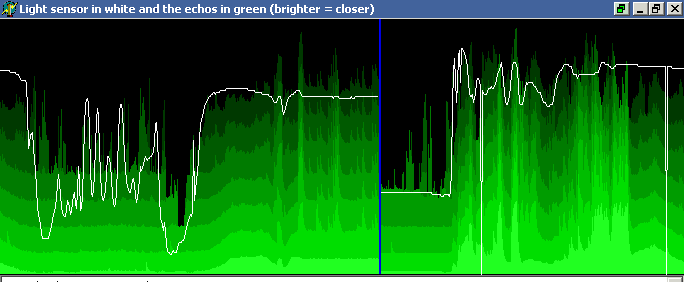
I got a pair of nice SRF-08 ultrasonic rangefinders for a robot project some time ago and decided to test them out with a PC first. I built a I2C adaptor for the parallel port and wrote some logging/graphing code to display the time-of-flight for the first eight echos returned.
Nothing fancy, but it was interesting to see how different obstacles affected the readings, and I added a little ‘Theremin’ mode for fun, where the first echo determines the frequency of a tone.
Microsoft likes to call these decorated names, to each their own. Here is what I’ve gleaned so far, use at your own risk. In particular, this has changed before (going to MSVC 4), and could quite possibly change in the future.
stdcall:
?funcName @@YG retType params-list Z

cdecl:
?funcName @@YA retType params-list Z

thiscall:
?methodName @ className @@AAE retType param-list Z

static method call:
?methodName @ className @@CA retType param-list Z
If there are parameters, param-list is a list of them, followed by a @. Otherwise, param-list is X (void), with no @ afterwards.
Basic types:
D is char
int8
E is unsigned char
uint8
F is short
int16
G is unsigned short
uint16
H is int
int32
I is unsigned int
uint32
J is long
int32
K is unsigned long
uint32
M is float
float32
N is double
float64
X is void
_J is int 64
int64
_K is unsigned int 64
uint64
_N is bool
Pointers:
PA prefixes a type to indicate a pointer
PB prefixes a type to indicate a const pointer
Note: volatile is not represented in the mangled/decorated name
Structures:
UstructName@@ is structName
a pointer to a struct occurs as PA or PB followed by a U...

Udigit@
Constructing reference to the previous digit-th U definition (1 based).
In other words, it creates a new definition that can be referenced later on as well.

digit
Reference to the previous digit-th U definition (0 based!!!)
For structures, a PAUname@@ will be referenced as 0 in other parameters of the form name *, but the first parameter of the form name will appear as U1@ and subsequently as 1.
The converse is having a Uname@@ first, and then parameters of the form name * will appear first as PAU1@ and subsequently as 1, and parameters of the form name as 0.
Note: 0 and 1 in these two examples are the positions of the first Ux@@ and first Uy@ declarations, they could be 2 and 4 if there were two decls before the first, and one decl in between.
Chilik is similar in concept to Nullsoft’s excellent AVS plugin for Winamp, extended to 3D. It presents a tree-view of a scene graph, where the user can insert or move different models, special effects (such as particle systems), or scene modifiers (blurs, clones).
The screen saver aspects of the program include saving/loading individual scene trees, an interactive preview of the rendered scene as it is edited, and sequencing options (such as which scenes to use and the transition mode between them).
Mappy 0.9d is the 4th release of the Mappy Virtual Machine and the first release to be Open Source. The complete source code to both the Mappy VM user interface and the Mappy VM core is available under the Bottled Light Public License, similar in terms to the MPL.
The binary version of Mappy VM 0.9d is an interim release to accompany the source code. In addition to a number of bug fixes, 0.9 is also considerably faster than 0.8. Most of the viewers have also been improved and the source debugger has been rewritten from scratch.
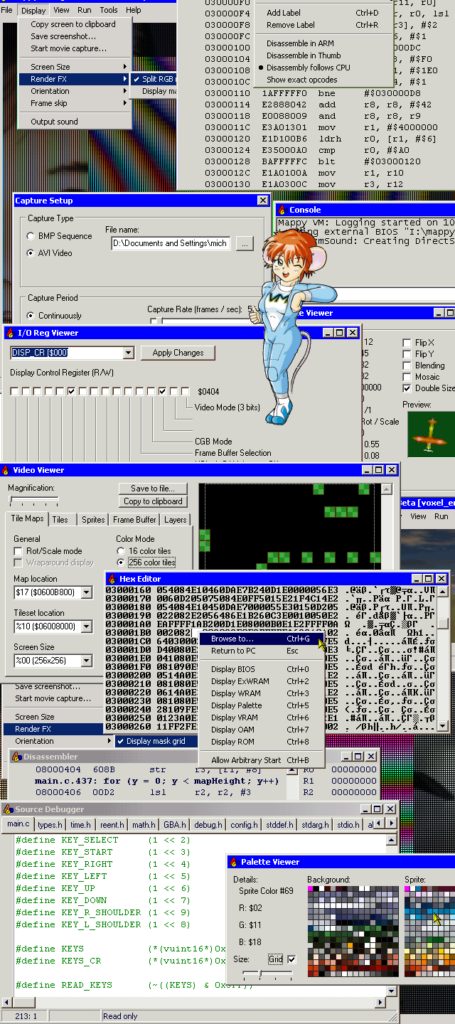
Mappy VM is a fully featured virtual machine which behaves very similar to the Gameboy Advance from Nintendo. It fully supports the CPU, input hardware, all graphics modes, DMA with correct timing, and many aspects of the sound system. Both a compiled version and the complete source code can now be downloaded from the Mappy VM website. However, it needs a BIOS image from a GBA for proper operation, as the included stub BIOS only includes an IRQ handler.
Mappy VM also provides an extensive suite of tools to assist developers in debugging and developing their games:
All of the viewers are updated in realtime as the simulation progresses, and most of them have editing capabilities. Being able to pause a simulation and edit system conditions can be extremely useful in attempting to reproduce bugs. In addition, Mappy VM also supports
saving or restoring the entire system state, making it easier to debug problems that only occur after several minutes of gameplay or to test multiple hypotheses.
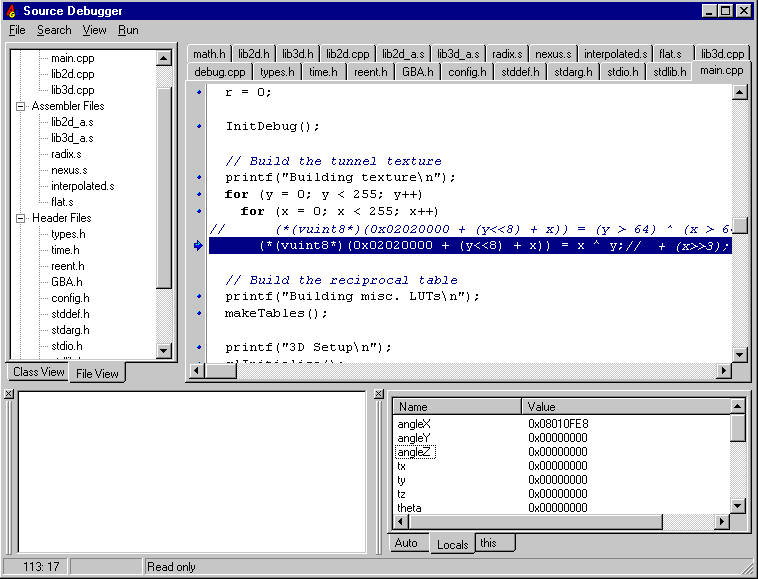
The source debugger from MVM 0.9 (current version)
A number of pictures from the current version (0.9) can be seen in the online help.